
You’ve only got a few seconds to grab attention with your sign and get someone to act, whether that’s walking into your shop, attending your event or remembering your business name. That’s why the right signage design tips matter – they help ensure your message cuts through quickly and clearly in the real world.
Designing effective signage isn’t always intuitive, especially when you’re juggling a million other things as a small business owner. Great signage design isn’t about being a professional designer. It’s about understanding a few practical principles that make your message impossible to miss. That’s why this guide explains signage design through clear, actionable tips you can apply straight away. Let’s dive in.
- Design for real-world visibility. Learn how contrast, font size and layout affect readability at a distance, not just how your sign looks on screen.
- Choose fonts, colors and layouts that work fast. Discover how legible typography, strong hierarchy and smart color choices help people understand your message in seconds.
- Match your design to its context. Understand how viewing distance, lighting, indoor vs. outdoor placement and foot traffic impact sign design decisions.
- Select materials that support your message. Explore how vinyl, PVC, aluminum and fabric affect durability, color vibrancy and long-term performance.
- Make your signage accessible and actionable. Apply accessibility best practices and clear calls to action so your signs are inclusive, compliant and easy to act on.
Contrast helps your sign design stand out
Creating contrast ensures people can read your sign quickly and easily. To create contrast with color, steer away from layering complementary or similar colors, such as orange text on a red background. Instead, pair colors that are going to stand apart from one another.
Think of it this way: black text on a white background is instantly readable. Black and yellow? High contrast and eye-catching. Blue text on white? Clear and professional. But navy text on a black background? That’s a recipe for a sign people will squint at and then walk past.
As a rule of thumb, a dark color for your background and a light color for your text (or vice versa) is the best way to create contrast in your signage design. High-contrast combinations don’t just look sharper, they also improve accessibility for people with visual impairments. Web Content Accessibility Guidelines (WCAG) recommend a minimum contrast ratio of 4.5:1 for normal text, and the same principle applies to physical signage. To check this, plug your text and background colors (using their hex codes) into a free contrast checker to see if they meet the recommended ratio.

But a lot of small business owners don’t consider that what looks high-contrast on your screen might look washed out on a banner in direct sunlight. Here, print finishes matter. A glossy finish can create glare in bright conditions, while a matte finish tends to preserve contrast better outdoors. Lamination adds a protective layer but can also change how colors appear under different lighting. The material itself plays a role: vinyl holds vibrant colors well, while some PVC finishes can make colors look slightly muted.
If your sign will be outdoors, test your color choices with lighting in mind. What works indoors might disappear outside.
Learn more about choosing the right colors for business signs.
Prioritize legibility and choose the right typography for your sign design
Readability is undoubtedly the most important factor of sign design. A sign is all about communicating a desired message, clearly and quickly – all the design choices you make should be made with this in mind.
When it comes to fonts, simple wins every time.
Sans-serif fonts like Arial, Helvetica and Open Sans are designed for clarity at a distance. They’re clean, they’re bold and they get the job done. Script fonts and brush lettering might look beautiful up close, but from across the street? They turn into an illegible blur. Save the fancy typography for your business cards, your sign needs to be readable in three seconds or less.
Discover the best fonts for signs to make your message stand out.

Case matters, too.
Using capitalization can be an effective way to call attention to a specific word or phrase in your signage design. But if you overuse it, ALL CAPS CAN ACTUALLY MAKE YOUR SIGN HARDER TO READ. Sentence case, using capitalization like in the main text of this article, is easier on the eyes and helps people scan your message faster.
Letter height determines how easy your sign will be to read from a distance.
The taller the letters, the easier your sign will be to see. It’s important to consider the height you’ll need your letters to be based on how far away your customers will be when reading your sign. As a general rule, letters should be at least 10 inches tall for every 100 feet of viewing distance. That means a sign read from 200 feet away needs a minimum of 20-inch letters, 300 feet requires at least 30-inch letters, and so on.
Print resolution (DPI) also affects how crisp your text looks when printed. For large-format signage, aim for at least 150 DPI to keep text sharp and professional-looking. Lower resolution can make even the best font choice look fuzzy and amateurish.
Think about context. A coffee shop window sign viewed from 10 feet away can use smaller, more detailed typography. A drive-by banner on a busy road? That needs bold, oversized text that drivers can read in a split second.
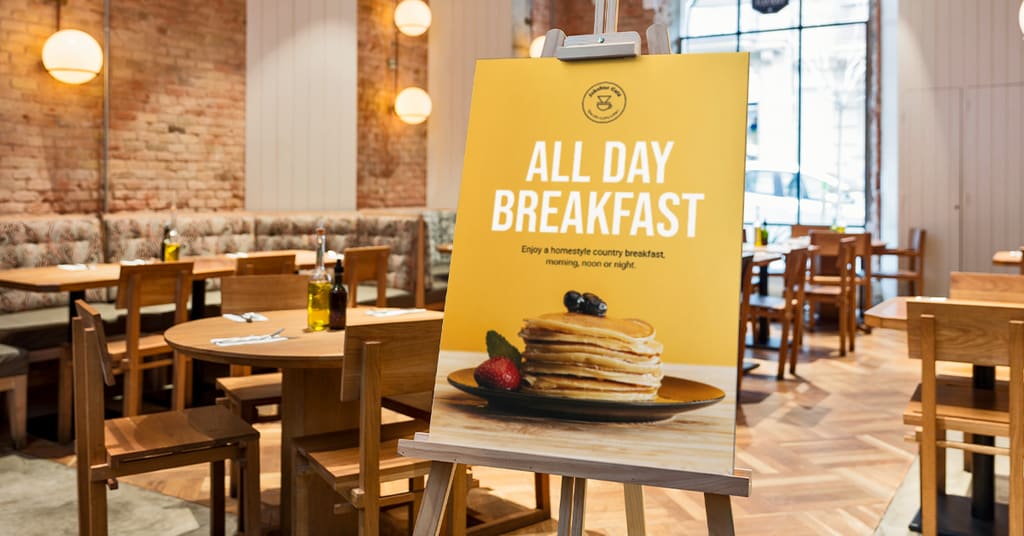
Legible typography is important to deliver your message.
Use sign layout and hierarchy to guide the eye
Guide the eye to the most important information first.
People scan signs in a predictable pattern: headline first, details second, call to action last. Your job is to make that process as smooth as possible. The hierarchy of the sign should reflect this.
Start with your main message, the one thing you absolutely need people to remember. Make it the biggest element on your sign. Then add supporting information in a smaller size. Finally, include your call to action or contact details in the smallest (but still readable) text.
Let’s say you’re advertising a lunch special. Your hierarchy might look like this:
- Largest: “Lunch Special”
- Medium: “$10 Monday-Friday”
- Smallest: “11am-2pm”
That’s clear, scannable and effective. But if you made everything the same size, people would struggle to figure out what’s important, and most would just keep walking.

White space is your friend.
Aim to leave 30-40% of your sign empty. That might feel wasteful, but it’s not. White space gives your message room to breathe and makes your content easier to digest. Cramming too much information into one sign is one of the fastest ways to make it ineffective.
Use sign templates to create layouts with built-in hierarchy. They’re designed to guide the eye naturally and take the guesswork out of spacing.
One more thing: sign size affects layout decisions. What works on an A4 poster won’t work on a 2-meter banner. Larger signs need bolder text, simpler layouts and more white space to stay readable from a distance.
Know the context for your sign design
Understanding how and where your sign will be viewed is paramount. A sign that works perfectly in one location might fail completely in another, and it all comes down to context.
Designing for foot traffic is different from designing for drive-by viewing. Pedestrians can linger and read more details. Drivers? They have seconds to glance at your sign while moving. That means drive-by signage needs larger text, fewer words and bolder visuals.
Indoor and outdoor signs have different challenges, too. Indoors, you have controlled lighting and no weather to worry about. Outdoors, your sign faces rain, wind, sun exposure and fluctuating light conditions. That impacts not just the material you choose, but also your font size, color choices and layout.
Before finalizing your design, ask yourself:
- How far away will people be when they read it?
- Will it compete for attention in a busy area or be the only sign visible?
- Is it indoors or outdoors?
- Will it be viewed by pedestrians, drivers or both?
Let’s look at some real-world examples. A retail storefront sign needs to be bold enough to stand out on a busy street but detailed enough to communicate your brand personality. A gym window sign can include class schedules because people are walking by slowly. An event banner needs massive text and minimal details because it’s competing with everything else happening around it. A realtor yard sign? That needs your name, logo and phone number, nothing more.
Context shapes everything. Design your sign for where it will actually live, not just based on what looks good on your computer screen.

Context is important when designing your sign. If your customers are walking by your shop, signage should be large and legible.
Choose materials that enhance your signage design
The material you choose affects how your sign looks, how long it lasts and how much it costs. Here’s a quick rundown of common signage materials and what they’re good for.
Vinyl is flexible, weather-resistant and perfect for banners. It holds vibrant colors well and works for both indoor and outdoor use. It’s also one of the more affordable options for temporary signage.
PVC is lightweight, durable and ideal for signs that need to hold their shape. It’s great for outdoor use because it resists moisture and UV exposure. PVC works well for yard signs, directional signs and event signage.
Aluminum is the heavy-duty option. It’s strong, long-lasting and perfect for permanent outdoor signage. Aluminum signs can handle extreme weather, but they’re also more expensive than vinyl or PVC.
Fabric banners are lightweight and easy to transport, making them ideal for indoor events or temporary displays. They’re not as weather-resistant as vinyl, so they’re better suited for controlled environments.

Fabric banners are perfect for indoor events or temporary displays.
Print execution details matter more than you’d think.
DPI (dots per inch) affects print quality. Again, aim for at least 150 DPI for large-format prints to keep your design sharp. Material finish (matte, gloss, textured) impacts how colors and contrast appear in different lighting. Matte finishes reduce glare, while glossy finishes make colors pop but can be harder to read in direct sunlight.
Lamination protects outdoor signs from fading and weather damage, but it also adds a slight sheen that can affect appearance. If your sign will be exposed to the sun for months, lamination is worth the investment. UV exposure and weather resistance are crucial considerations for outdoor signage.
Balance expense and function when choosing materials
Cost is always a factor for small businesses. Vinyl and PVC are budget-friendly and versatile. Aluminum costs more upfront but lasts longer, making it a good investment for permanent signage. Fabric is affordable for indoor use but won’t hold up outdoors.
Think about what works for your specific needs. Outdoor weather resistance or indoor elegance? Temporary promotion or long-term branding? The right material makes all the difference.
Keep your signage on-brand and include a clear call to action
Your sign should be aligned with the rest of your brand.
Consistent brand identity builds recognition and recognition builds trust. So, use your brand colors, fonts and logo wherever possible, but not at the expense of readability. If your brand colors are low-contrast (like yellow on white), you might need to adjust them for signage. Your logo should be present, but it doesn’t need to dominate the entire sign. Balance brand personality with legibility. Your sign needs to feel like your brand while still doing its job.
Every sign should include a clear call to action.
What do you want people to do after they see your sign? Visit your website? Walk into your store? Call for a quote? Be specific.
Here are some examples of effective CTAs by business type:
- Retail: “Shop our sale” or “Come in and browse”
- Hospitality: “Book your table” or “Try our new menu”
- Events: “Register today” or “Save your spot”
- Services: “Call now for a quote” or “Visit us online”
Specificity matters. “Visit us” is vague. “Stop in for 20% off today” is actionable. The more specific your CTA, the more likely people are to follow through.
Find inspiration with these small business sign ideas.

Make sure all your signage is on-brand and cohesive in color and theme.
Use color strategically in your sign layout to inspire action
Colors have specific mental, emotional and cultural connotations
Color psychology can influence consumer behavior and purchasing decisions. Red evokes excitement and urgency, perfect for sales and promotions. Blue conveys trust and dependability, making it ideal for professional services. Green suggests nature, health and growth. Yellow grabs attention and feels optimistic.
Cultural considerations matter, too. In some cultures, white symbolizes purity; in others, it represents mourning. If your business serves a diverse community, research how your color choices might be interpreted.

Blue often conveys health and evokes thoughts of the ocean – perfect for a poke store.
Consider color as another tool
But color isn’t just about psychology, it’s also a practical tool for guiding the eye. Use bright colors for your call to action to make it pop. Use neutral colors for backgrounds to keep the focus on your message. Color directs attention, so use it intentionally.
As we have mentioned throughout this article, colors appear differently on screen vs. in print. What looks vibrant on your laptop might print darker or lighter depending on the material and ink used. Color calibration matters. If you’re printing a sign, request a proof or test print to make sure your colors look the way you expect.
Learn more about choosing colors for business signs.
When choosing colors, always check contrast using an online contrast checker. Even on-brand colors won’t work if your sign isn’t readable at a glance.
Make your signage accessible and compliant
Accessibility isn’t just the right thing to do, it’s also good for business. Making your signage accessible to everyone expands your potential customer base and shows that your business values inclusivity.
Here’s how to improve accessibility in your sign design:
- High contrast ratios: WCAG 2.1 guidelines recommend a minimum contrast ratio of 4.5:1 for normal text. Use tools like contrast checkers to test your color combinations.
- Clear, legible fonts: Stick to simple, sans-serif fonts at appropriate sizes. Avoid overly decorative typography that’s hard to read.
- Don’t rely on color alone: If you’re using color to convey information (like red for “closed” and green for “open”), include text or symbols as well. Color-blind individuals rely on more than just color to understand your message.
- Tactile or Braille signage: In some cases, particularly for permanent building signage, tactile or Braille elements may be required by law.
Familiarize yourself with relevant accessibility standards
ADA (Americans with Disabilities Act) requirements apply to certain business signage, particularly permanent signs like room identifiers and directional signs. ISO 3864 sets standards for safety signage. These regulations vary by location and business type, so check what applies to your situation.
Accessible design benefits everyone, not just people with disabilities. High contrast, clear fonts and simple layouts make your sign easier for everyone to read.
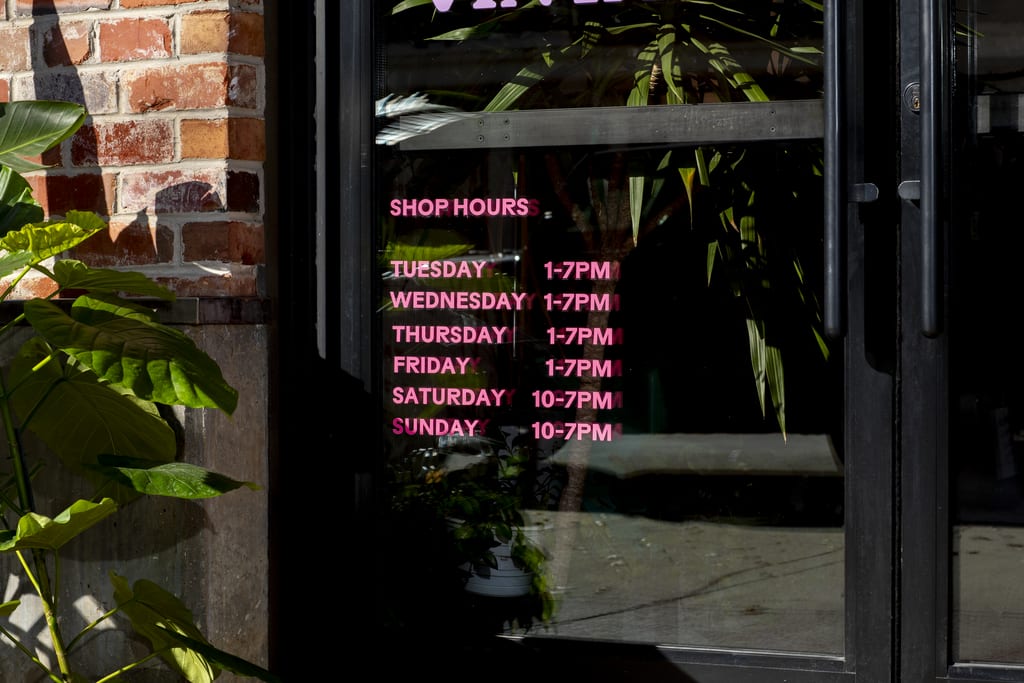
Use legible fonts at appropriate sizes, and avoid overly decorative typography for instructional signage like opening hours.
Design tips for digital signage
Digital signs are a growing option for small businesses, and this format works differently from print signage in a few key ways.
Digital makes sense when your message changes frequently
Cafes with rotating menus, gyms with updated class schedules and retail stores with weekly promotions all benefit from digital signage. Instead of printing new signs every week, you can update content digitally, saving time and money.
Design tips specific to screens:
- Character limits and message clarity: Keep it even shorter than print. People scan digital screens quickly, so your message needs to be instant.
- Safe zones: Leave space around the edges of your design so text isn’t cut off by the screen bezel.
- Animation speed: Slow enough to read, fast enough to keep attention. Nothing frustrates viewers more than text that disappears before they finish reading it.
- Slide timing: Give each message at least 5-7 seconds on screen. Any less and people won’t have time to absorb the information.
Don’t abandon print entirely. Digital and print signage work well together – use digital for changing information and print for permanent branding.
Common sign design mistakes to avoid
Even with the best intentions, it’s easy to make mistakes. Here are the most common signage design errors for print and digital and how to avoid them:
- Using too much text. Your sign isn’t a brochure. Stick to one clear message and a simple call to action. The more text you cram onto a sign, the less likely people are to read any of it.
- Low-contrast color combinations. If you can’t read it from across the room, your customers won’t be able to either. Test your color choices in real-world conditions before printing.
- Ignoring viewing distance. A font size that works for a poster won’t cut it for a banner 20 feet away. Always design for where your sign will actually be viewed.
- Overcrowded layouts. White space is your friend. Use it to help your message breathe and guide the eye to what matters most.
- Designing for screen only, not print. What looks perfect on your laptop might not translate to vinyl or PVC. Always consider your final material and placement before finalizing your design.
- Choosing style over readability. That fancy script font might look beautiful, but if people can’t read it quickly, it’s not doing its job. Prioritize clarity over aesthetics every time.

A font size that works for a poster won’t work for a banner. Design for the context your sign will be viewed.
Signage design tips that actually work
Effective signage design combines clarity, smart execution and understanding how your sign will be seen in the real world. You don’t need a design degree to create a sign that works, you just need to follow a few practical principles.
The best signage designs are the ones that look just as good in the real world as they do on your screen. Think about design and print together from the start. Consider your materials, your lighting, your viewing distance and your audience. Make intentional choices about color, typography, layout and contrast.
Your sign is often the first impression customers have of your business. Make it count.
FAQs about sign design
How can I choose the best sign ideas for my specific business goals?
Start by identifying what you want your sign to accomplish. Are you building brand awareness, promoting a sale or directing foot traffic? Match your sign type to your goal.
For example, use banners for temporary promotions, window decals for permanent information and yard signs for directional guidance. Learn more about small business sign ideas to find what works for your needs.
Do small business signs need to follow specific design principles to be effective?
Yes. Effective small business signs prioritize readability, contrast and clear hierarchy. Use simple fonts, high-contrast colors and a layout that guides the eye to the most important information first. Keep your message concise and include a clear call to action. These principles apply whether you’re designing a storefront banner or a promotional poster.
How can creative sign ideas help my business stand out from competitors?
Creative signage grabs attention and makes your business memorable. Use unexpected colors, bold typography or unique shapes to differentiate yourself. But creativity should never come at the expense of clarity, make sure your sign is still easy to read and understand. Explore creative sign ideas for inspiration.
Where should I place my business signs for maximum impact?
Place signs where your target audience will see them. For storefronts, position signs at eye level and in high-traffic areas. For outdoor signage, consider visibility from both pedestrian and vehicle perspectives. Test different placements to see what drives the most engagement.
What’s the best way to hang a sign?
The best hanging method depends on your sign type and location. For posters, use adhesive strips, frames or clips. For banners, grommets or pole pockets work well. Make sure your sign is securely mounted and won’t be damaged by wind or weather. Learn how to hang a poster for step-by-step guidance.