

Steps to duplicate your design
1
Open your design
Open the design you want to duplicate in design studio.
2
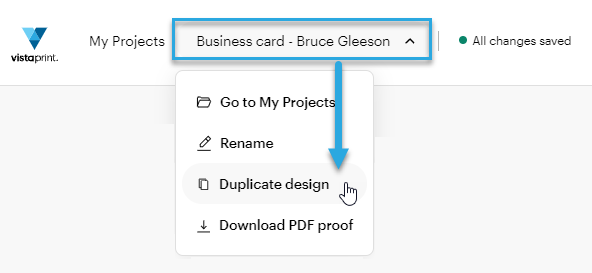
Select the design name to open the menu
The name appears at the top of the editor.
3
Select Duplicate design
4
Name your new design
Enter a new name for the duplicated version so you can tell it apart from the original.
5
Edit and save the duplicated version
Make any changes you want to the new version, then select Save changes.
All versions of your design are stored in your My Projects folder. You can repeat this process as many times as needed to create different versions of the same design.
When to duplicate your design?
Duplicating designs can help you save time and make sure all designs are consistent. This is, for example, useful when you are:
Creating business cards with different contact details for team members
Saving alternate layouts or color variations
Making small updates without changing the original design

